Classroom
Open a resource for a lesson on a copy, never the original. The copy
goes to <sessions folder>/<date>/<lesson label>/ and opens in your editor
(Thonny by default). Afterwards: see what you changed, re-open it, or
promote the edited version back beside the original as name_v2.py.
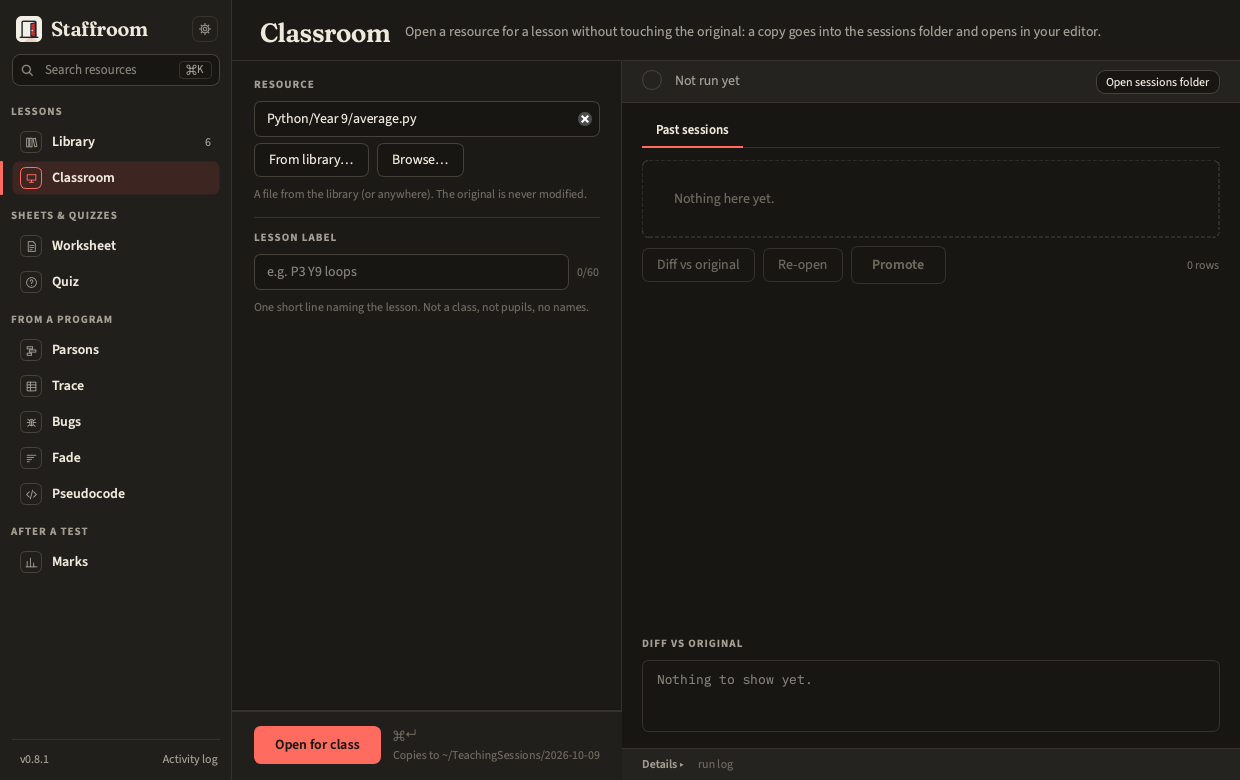
In the panel
- Resource: pick from the library (⌘O gets you here) or browse.
- Lesson label: one short line, e.g.
P3 Y9 loops. Not a class, not pupils. - Open for class.
Past sessions lists every copy classroom made: the files in each
<date>/<lesson label>/ folder that has a .origin.json. Anything else in
the sessions folder is left out, including outputs/, where tools save
sheets made with no input of their own (Outputs),
and folders or files you put there by hand. Select one for Diff vs original,
Re-open or Promote (copies back next to the original under a new
versioned name; never overwrites). Promote first compares the copy with the
original and with the latest promoted version: an unchanged copy writes
nothing, and the message says so (Already promoted as resource_v2.py: the
copy has not changed since, or No changes: the copy matches the original
resource.py; nothing to promote).
Edit the copy again and the next promote makes _v3.
Each session folder also holds a .origin.json with the lesson label and,
for each copy, the absolute path of the original it came from: that is how
Diff and Promote find their way back. The label is at most 60
characters, and the app cannot check what you put in it, so keep it to the
lesson (Privacy).
On the command line
staff classroom open path/to/resource.py --label "P3 Y9 loops"
staff classroom list
staff classroom diff "2026-10-06/P3 Y9 loops/resource.py"
staff classroom promote "2026-10-06/P3 Y9 loops/resource.py"
staff classroom reopen "2026-10-06/P3 Y9 loops/resource.py"
Settings that matter
Settings › Classroom: Sessions folder (local by default) and Editor
(Thonny, IDLE, System default, or Custom with a Command in which {file}
is replaced by the copy's path).