Marks
Raw marks per question, one row per script, no names → a one-screen report: how the class did and which questions to reteach. Only class-level aggregates are ever saved.
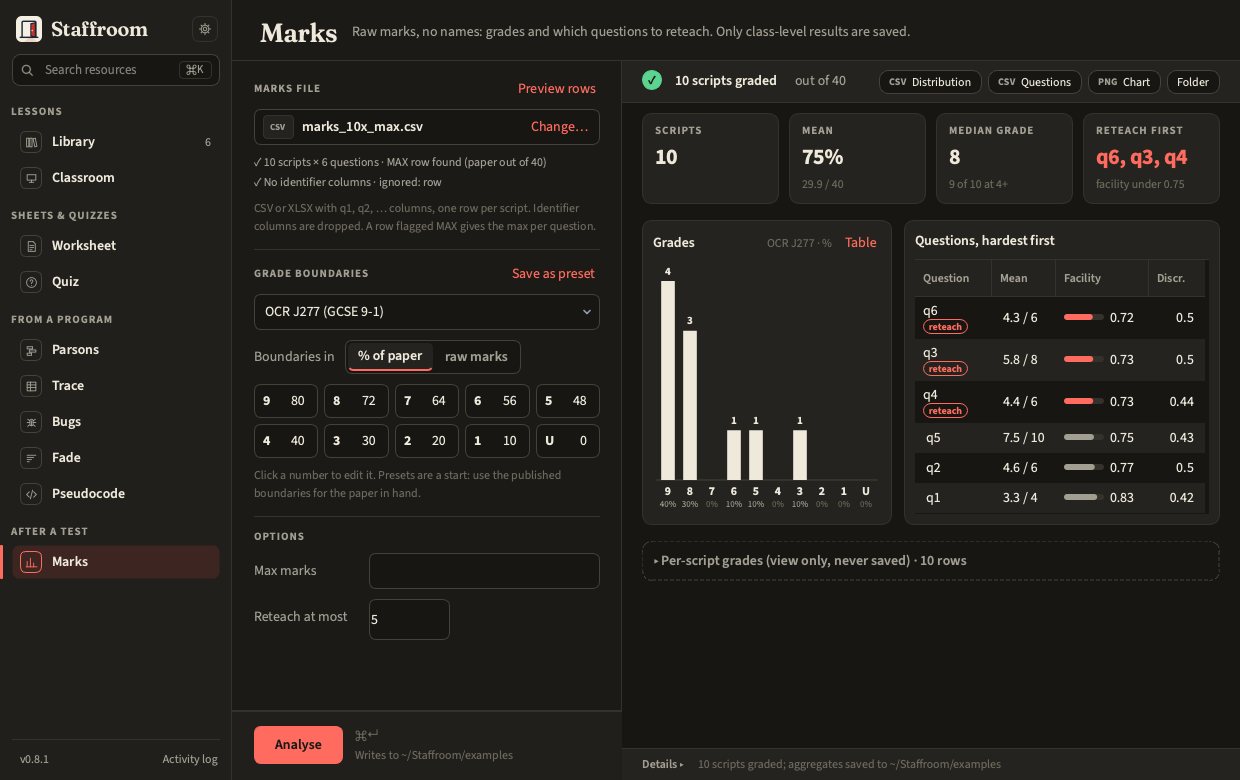
After Analyse the report reads top to bottom:
- Four headline tiles. Scripts; Mean as a percentage of the paper (with the mean mark out of the total); Median grade, the grade of the median total, with how many scripts reached grade 4 (or, for boundaries without a 4, the lowest grade above zero: E for A-level, Pass for Pass/Fail); and Reteach first.
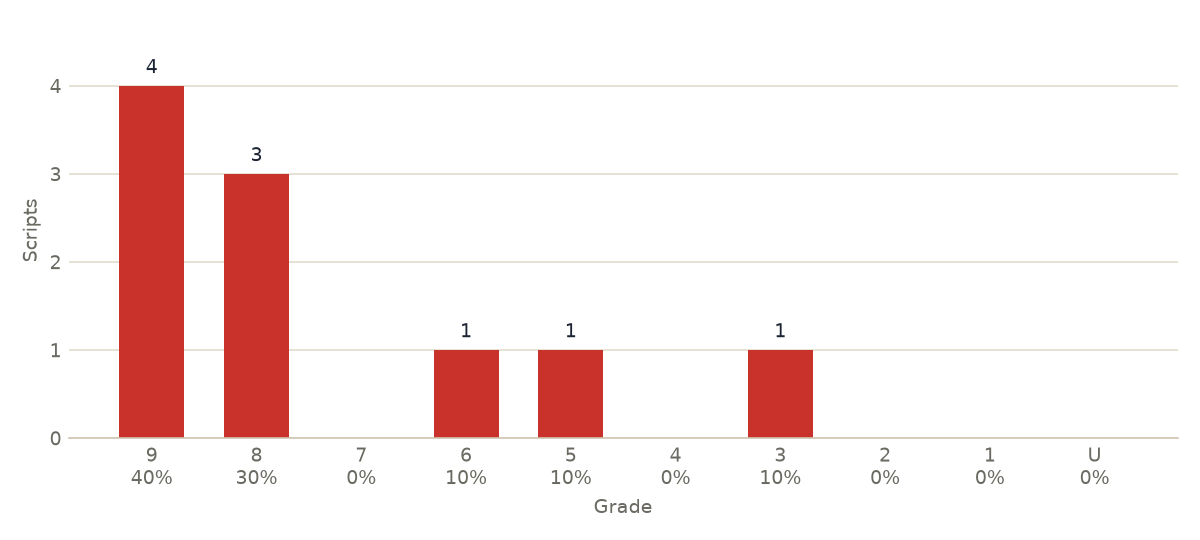
- The grade chart, with the count over each bar and the share of scripts under it. Table flips it to the numbers (to one decimal place, and the Incomplete scripts row when there is one).
- Questions, hardest first: one table sorted by facility, lowest first, with the mean out of the max, an inline facility bar and discrimination. The questions to reteach are tagged reteach: the lowest-facility questions the class did worse on than on the paper as a whole, at most Reteach at most of them (5 by default). A question's note (hard, easy, weak discriminator) is in its tooltip and in the saved CSV.
- Per-script grades, folded under one line that says view only, never saved. Open it to check a script; it is never written to a file.
Input file
A CSV or XLSX with question columns q1, q2, … (see
Marks files). Once chosen, the file shows as a
chip with what was found in it: how many scripts and questions, whether a
MAX row gives the paper total, and which columns were dropped as
identifiers or ignored. Preview rows opens the rows themselves. Max marks come from the Max marks
option when it is set, else from a row flagged MAX (the word can be in any
cell, including a name column that is about to be dropped), else, with a
warning, from the highest mark seen. Identifier columns are dropped on load; what that catches
and what it does not is in Privacy.
Warnings
The run log warns, before you trust the numbers, when:
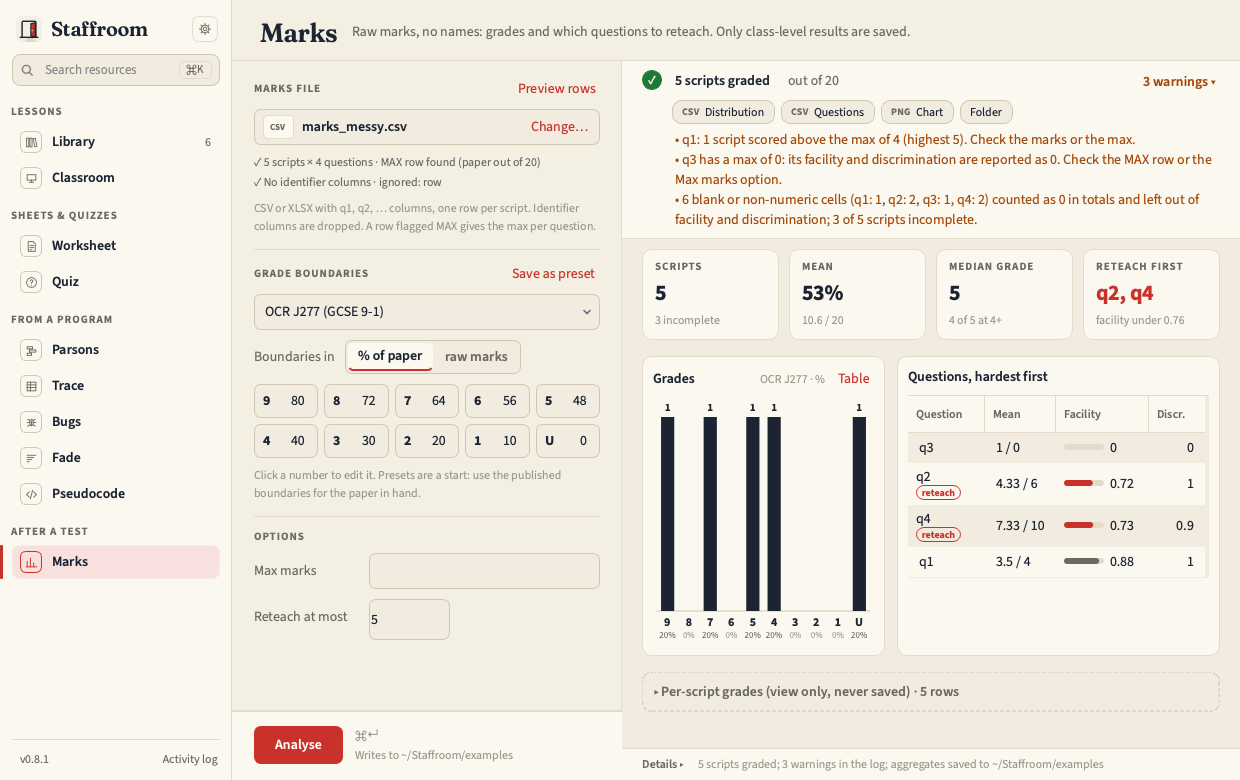
- a question has a max of 0 (its facility and discrimination are reported
as 0: check the
MAXrow or the Max marks option); - a script scored above a question's max;
- cells are blank or non-numeric (
abfor absent,-, an empty cell). They count as 0 in that script's total and grade and are left out of facility and discrimination, and the distribution table gains a last row, Incomplete scripts, saying how many scripts were affected. The chart leaves that row out; - a grade boundary is above the paper total, which is what a percent preset applied with the unit set to raw marks looks like.
Nothing in the list stops the run. examples/marks_messy.csv makes every
warning fire if you want to see them.
The result strip counts them ("3 warnings ▸"); click the count for the list. Each is also in the run log under Details.
Boundaries
A compact grid of grade and minimum, five to a line: click a number to edit it. Boundaries in switches between percent of the paper and raw marks. Built-in presets for OCR J277, AQA 8525 and A-level are starting points: choose one, edit it to the published boundaries and Save as preset.
Outputs
| On screen | Saved |
|---|---|
| Headline tiles | never (worked out again on every run) |
| Grade chart (and its table) | <stem>_distribution.csv and .png |
| Questions, hardest first, reteach tagged | <stem>_questions.csv (in paper order) |
| Per-script grades (folded, view only) | never |
The chart is drawn for paper and slides, white background whatever theme the launcher is using, so it can go straight into a report.
Facility is the mean mark as a fraction of the max; discrimination is the
difference between the top and bottom third's mean, over the max. Both are
spelled out in the Glossary. Files go
next to the input, or to ~/TeachingSessions/outputs/marks/ when the input is
in the resources folder, unless Settings names an output folder
(Outputs).
staff marks run marks.csv --preset "OCR J277 (GCSE 9-1)" --unit percent --max 4,6,8,6,10,6
staff marks presets
The command line prints the same report: the four headline numbers, the
grade distribution and the questions hardest first (--worst N sets
Reteach at most).